


Sunrun
3.6636.00 Reviews
App Specs
- Version
- 3.2.0
- Updated On
- License
- Free
- Downloads
- 100,000+
- Developer
- Sunrun, Inc
- Categories
- House & Home
- Platform
- Android, iOS
Screenshots
 Analysis by AppCompare
I see Sunrun as a practical account companion for people who already use Sunrun for their home energy system, rather than a general solar tool for anyone curious about panels. That distinction matters: its value depends less on exploring solar in the abstract and more on whether you want a convenient way to keep an eye on your service, bills, and support from your phone. I’d consider it most useful when it helps with a task I would otherwise handle through a separate account or customer-service interaction.
The app is free to download, so there is no app purchase price to weigh against those everyday conveniences. That makes trying it a low-cost decision in the narrow sense of app access, but it does not tell you what a Sunrun system or service costs. I wouldn’t treat “free” as evidence that solar itself is free, or use the app’s price as a shortcut for judging a household energy plan. The useful question is whether having account tools on hand saves you time once you are already a Sunrun customer.
What the phone app is best suited to handle
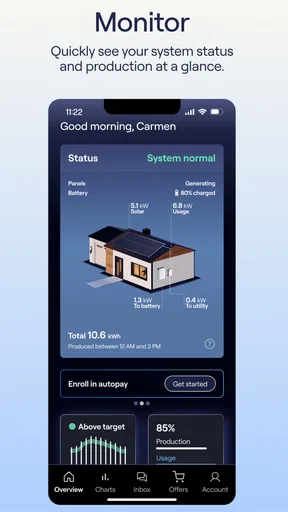
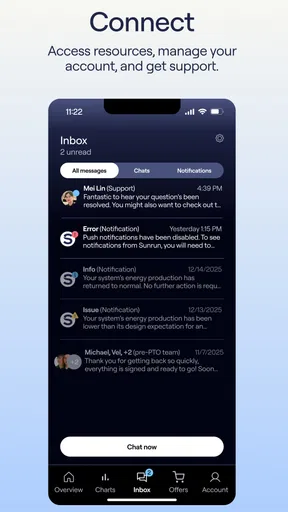
Sunrun, Inc. presents this as a home-focused app for customers to monitor systems, pay bills, and get support. I like that combination because those needs tend to come up at different moments: checking how a system is doing is a quick glance, while billing and support matter when there is something specific to resolve. Having them in one customer-facing place can reduce the friction of remembering where to go, especially if you manage household tasks on your phone.
That does not make it a replacement for every energy tool. A homeowner who wants a broad comparison of solar providers, a general electricity-price tracker, or an independent analysis of household consumption should look elsewhere for those jobs. I’d use Sunrun for the relationship with Sunrun, not as a neutral dashboard for every energy decision. It is a narrower role, but a clearer one.
Everyday value, with a customer-only boundary
Picture checking a bill while sorting household expenses, then using the same app to find a route to support if something about the account needs attention. That is the kind of ordinary convenience I expect to matter more than opening the app just to browse. If your system is running normally and there is no bill or service question, you may have little reason to check it daily. For many customers, occasional use is a sign that the app is doing a quiet administrative job, not a reason to judge it by how often it demands attention.
Before relying on any account app for an urgent issue, I’d make sure I can sign in and find the relevant support path while things are calm. That small check avoids discovering a password or account-access problem at the exact moment I want help. I’d also keep the usual account details available when contacting support; a mobile interface can make a service task easier to start, but it does not remove the need to explain what is happening.
How I would judge the tradeoffs
Sunrun has an average rating of 3.9 from around 1,300 ratings, with roughly 600 written reviews, and more than 100,000 installs. I read that as evidence of an established customer app with a mixed enough response that I would keep expectations practical. Those figures do not tell me how it will behave on a particular phone or account, so I’d focus on whether the core tasks I need—system monitoring, bill payment, or getting support—are convenient in my own routine.
Worth Reading Before You Choose

EA SPORTS FC Mobile 26 Is a Bigger Football Game, but It Takes Time

Flipboard Shows What News Apps Must Do Beyond the Feed

Switching to Android Auto Means Rethinking Your Driving Routine

Google Calendar Makes a Crowded Week Easier to Manage

Ludo King Makes the Most of the Minutes Between Plans

Baby Panda World Brings Quick Play to Modern Phones, but Its Game Library Feels Busy
The app is listed for Everyone and is free, while version 3.1.0 requires Android 7.0 or later. It was released on May 16, 2023. Those details make it straightforward to assess basic access, but the bigger limitation is relevance: if you are not a Sunrun customer, the central account functions are unlikely to offer much. If you are, I’d still keep another way to reach the company available for time-sensitive needs rather than assuming an app is the only channel that matters.
Getting Started with Sunrun
First things first, let’s talk about the setup. Downloading the Sunrun app is as easy as pie. Available on both Android and iOS, you can find it in the usual spots like the Google Play Store or the App Store. Once you’ve got it on your device, signing up is a breeze. Just a few taps and you’re ready to dive into the world of solar energy.
The interface is clean and intuitive. You don’t need to be a tech wizard to navigate around. The app guides you through the initial setup, helping you understand your solar options based on your location and needs. It even offers a neat little tutorial for newcomers, which I found super handy.
Features That Stand Out
Here’s where things get interesting. Sunrun isn’t just about monitoring your solar panels. It’s got some nifty features that make it stand out.
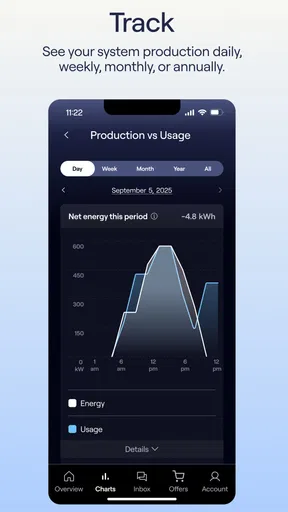
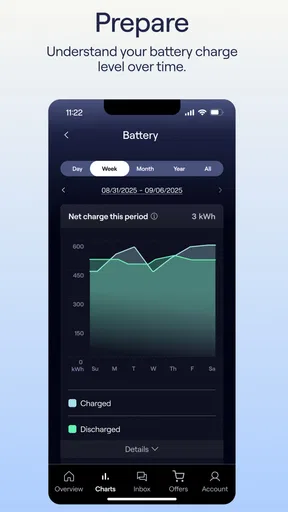
- Energy Usage Monitoring: You can keep track of how much energy you're generating and using. It’s satisfying to watch those numbers and know you’re doing your bit for the planet.
- Cost Savings Tracking: This feature shows you exactly how much money you’re saving. It’s a real eye-opener and a fantastic motivator to keep optimizing your energy usage.
- Maintenance Alerts: The app alerts you when it’s time for maintenance, so you’re always on top of things. No more surprise bills or downtime.
- Community Support: There’s a vibrant community within the app where users share tips, tricks, and support. It feels like having a team cheering you on.
My Personal Experience
Using Sunrun has been a bit of a journey for me. I started off knowing next to nothing about solar energy, but the app has a way of making it all seem so approachable. There’s something incredibly rewarding about watching the sun do its thing and knowing you’re benefiting from it.
One of the highlights for me was the cost savings tracking. Seeing those numbers climb is both satisfying and motivating. It’s like getting a pat on the back for being environmentally conscious.
I did run into a few hiccups though. The app sometimes takes a while to update the energy usage stats, especially if there’s a cloud cover. But hey, a little patience doesn’t hurt, right?
Wrapping It Up
All in all, Sunrun is a fantastic tool for anyone looking to dive into solar energy. Whether you’re a seasoned solar enthusiast or a complete newbie, the app has something to offer. With its user-friendly interface and robust features, you’ll find yourself checking it more often than you’d expect.
If you’re ready to join the solar revolution and watch your savings grow while reducing your carbon footprint, give Sunrun a try. It’s a step towards a brighter, more sustainable future, all from the convenience of your smartphone.
Making the app useful without overchecking it
For a household that already has Sunrun equipment, the most sensible workflow is to use the app as a check-in tool rather than a live control room. I’d look at system information when I have a reason—after noticing a change at home, while reviewing household energy, or when I’m already handling a bill. That keeps the figures in context instead of encouraging me to interpret every short-term fluctuation as a problem.
A useful habit is to compare the app’s information with the same kind of information over a longer stretch, not just one glance. Solar output can vary with conditions, so a single quiet period is not enough on its own to tell me that equipment needs attention. If something looks unusual, I’d note what I saw and when, then use the support route rather than trying to diagnose hardware from a phone screen. The app can help me notice and communicate a question; it should not turn me into my own technician.
That distinction is especially helpful for people who share household responsibilities. One person can check the account or bill while another handles the conversation about a system concern, without either needing to keep every detail in memory. I would still make sure the person who actually manages the Sunrun account knows how access works, since an app is only convenient when the right person can get into it.
Choosing between this and other energy apps
Compared with a utility company’s app, Sunrun is more directly relevant to the Sunrun customer relationship. A utility app is usually the natural place to deal with utility-side billing or account matters, while Sunrun’s app is the place I would turn for Sunrun system and service tasks. Depending on how a home’s energy arrangements are set up, a customer may reasonably use both; one does not automatically replace the other.
Compared with a general solar-monitoring app, the appeal here is the connection to the provider rather than broad compatibility or independent analysis. If I only want to learn about solar before choosing a provider, a general information source will be more useful. If I already have a Sunrun account and want a single mobile starting point for checking the system, paying a bill, or seeking help, this app has a more concrete purpose. That focus is a strength for customers and a reason for noncustomers to skip it.
I would also separate convenient account access from financial evaluation. A screen that presents system or savings information can help me follow what is happening, but I would not use an app view alone to decide whether a solar arrangement is a good deal for my household. For that, I’d consider the relevant contract and bills alongside the app, because the app’s convenience does not replace a careful look at the underlying costs and terms.
Who is likely to get the most from it
I’d recommend trying it if you are a Sunrun customer who prefers handling routine account tasks on a phone and wants a convenient way to check system information. It may be particularly useful for someone who pays household bills digitally, wants to keep an eye on a system without going to a separate portal, or needs a direct starting point when a service question comes up. Since access is free, there is no app purchase decision to make before testing whether that workflow fits.
I would not recommend downloading it simply because you are interested in solar energy. Without the Sunrun customer relationship, its central value is limited, and it is not a substitute for comparing providers or learning the basics of home energy. Nor would I make it the sole option for a household member who needs to contact support urgently but is unfamiliar with account access. Set up and understand the sign-in while there is no pressure, and keep a familiar alternative contact route in mind.
A measured buy-or-skip verdict
For me, Sunrun earns its place as a free, practical companion for customers, not as a must-have solar app for everyone. The strongest reason to keep it is the convenience of bringing system checks, billing, and support into one customer-focused mobile experience. The main tradeoff is that this usefulness is tied to Sunrun, and the app’s information should be treated as one aid to managing a home system rather than a complete answer to every energy or financial question.
If you already use Sunrun, I’d give it a try, confirm that you can reach the account tasks you care about, and use it when those tasks arise. If you are comparing solar providers, want an independent household-energy dashboard, or do not have a Sunrun account, I’d skip it for now and choose a tool designed for that broader purpose. That is a more honest measure of its value than expecting a customer app to do everything.
Pros
- User-friendly interface for easy navigation.
- Real-time energy usage tracking.
- Customizable notifications for updates.
- Integration with smart home devices.
- Detailed solar panel performance reports.
Cons
- Limited offline functionality.
- Occasional syncing delays.
- Requires constant internet connection.
- Customer support response can be slow.
- High battery consumption.
FAQs for Sunrun
What is Sunrun and what does it offer?
Sunrun is a solar energy company that provides solar panel installation, maintenance, and financing options for residential homes. It aims to help homeowners save on electricity bills by harnessing solar power. Sunrun offers different plans, including solar leases and power purchase agreements, to suit various financial preferences.
How does Sunrun’s solar panel installation process work?
Sunrun’s installation process begins with a consultation to assess your home’s solar potential. After designing a custom solar system for your needs, professional installation teams manage the installation, ensuring compliance with local regulations. Sunrun handles permits and inspections, providing a seamless experience from start to finish.
What financing options are available with Sunrun?
Sunrun provides several financing options, including solar leasing, power purchase agreements (PPAs), and outright purchases. Leasing and PPAs allow you to pay little to no upfront costs and pay for the solar power generated monthly. Outright purchases involve buying the system for long-term savings and tax benefits.
Is maintenance included with Sunrun’s solar plans?
Yes, Sunrun includes maintenance and monitoring with its solar leasing and PPA plans. This means that Sunrun takes care of repairs and system performance checks at no additional cost, ensuring your solar panels operate efficiently throughout the agreement period. This service provides peace of mind for homeowners.
How does Sunrun impact electricity bills and savings?
By switching to Sunrun, homeowners can expect a reduction in electricity bills as they generate their own solar power. The amount saved varies based on the size of the system and local electricity rates. Sunrun provides a detailed savings estimate during the consultation, helping users understand potential financial benefits.


